
Description
AskAny is the only WordPress AI chatbot that combines RAG (Retrieval-Augmented Generation), real-time SSE messaging, live agent handoff, and native WooCommerce order tracking – all in one free plugin.
Most AI chatbots for WordPress guess at answers. AskAny doesn’t. It indexes your entire site, PDFs, and external sources using semantic search and retrieves the right content before every response – so answers are accurate, cited, and specific to your business.
🚀 AskAny AI Website | 📖 Documentation | 💬 Pro Support
“The only WordPress AI chatbot that reads your site, not just your API key.”
Why AskAny Beats Every Other AI Chatbot Plugin
- RAG Architecture – Retrieval-Augmented Generation means the AI retrieves your actual content before answering, not generic AI guesses. Sources are cited in every response.
- SSE Real-Time Chat – Server-Sent Events deliver instant streaming responses like WhatsApp – with 90% less server load than polling-based chatbots.
- Live Agent Handoff – AI chats seamlessly escalate to human agents in real-time, with full conversation context preserved.
- 6 AI Providers, No Lock-in – Switch between OpenAI, DeepSeek, Gemini, Claude, Grok, and OpenRouter without losing data.
- WooCommerce Order Tracking – Customers can check order status by email, order ID, or transaction ID directly inside the chat.
- Fallback Mode – When your AI API is unavailable, AskAny keeps answering using indexed content and pattern matching. Zero downtime.
How AskAny Works in 3 Steps
- Index – AskAny automatically crawls your posts, pages, products, PDFs, Q&A pairs, and external URLs into a semantic search index.
- Retrieve – When a visitor asks a question, AskAny retrieves the most relevant content chunks using hybrid semantic + keyword search.
- Respond – The AI generates an accurate, cited answer using only your indexed content. No hallucinations. No guesses.
This is RAG – and no other free WordPress AI chatbot does it as completely as AskAny.
RAG Architecture & Intelligent Content Indexing
AskAny’s RAG system is the foundation that makes it different from every other chatbot in the WordPress directory:
- Semantic Search – Understands meaning and context, not just keyword matches. Finds conceptually related answers across all your content.
- Hybrid Search – Combines semantic search with keyword matching for maximum accuracy on production sites.
- Content Hash Caching – Reuses embeddings for unchanged content, cutting API quota usage by up to 90%.
- Batch Embedding – Processes multiple texts in one API call – 10x fewer API calls for large sites.
- Smart Update Detection – Only re-embeds content when it actually changes.
Content types indexed:
Posts, Pages, Custom Post Types, WooCommerce Products, Product Categories, Custom Fields, Comments, Menus, PDF Documents, External URLs, Q&A Pairs, and FAQs.
Real-Time SSE Communication
AskAny is the only WordPress AI chatbot using Server-Sent Events (SSE) for real-time streaming:
- 90% Less Server Load – SSE pushes messages instead of polling every few seconds.
- Instant Streaming Responses – Characters appear as they’re generated, like modern AI chat apps.
- Automatic Fallback – Gracefully degrades to polling if SSE is not supported by the server.
- Zero Configuration – Works out of the box with no extra setup.
Live Agent Chat & Human Handoff
- Real-time agent dashboard for managing conversations from WordPress admin
- Seamless AI-to-agent handoff – context and history are preserved on transition
- Agent assignment and role-based access
- Online/offline agent status tracking
- Unread message badge and notification system
- Slack integration – receive chat notifications and reply from anywhere
- Mobile App Push Bridge – chat with visitors from Android without opening WordPress
WooCommerce Integration
AskAny has the deepest WooCommerce integration of any free AI chatbot plugin:
- Order status lookup by email, order ID, or transaction ID
- Real-time stock availability and product information
- Smart product recommendations based on conversation context
- Direct add-to-cart support from chat
- Price and specification queries handled automatically
6 AI Providers – Maximum Flexibility
Choose the provider that fits your budget and use case:
- OpenAI – GPT-4o, GPT-4o-mini, GPT-4.1, O4-mini
- DeepSeek – Cost-effective with powerful reasoning
- Google Gemini – Gemini 2.0 Flash, Gemini 2.5 Flash-Lite
- Anthropic Claude – Advanced reasoning and safety
- X.AI Grok – Real-time knowledge
- OpenRouter – Access to 100+ models from multiple providers
Switch providers at any time without losing indexed content or conversation history.
Knowledge Base & Content Sources
Train your AI on every content source your business has:
- PDF Import – Drag-and-drop PDF upload with automatic text extraction and RAG indexing
- External Sources – Index any external URL, REST API, JSON endpoint, or XML feed
- Q&A Management – Add custom Q&A pairs with Markdown support, bulk import/export
- Automatic Site Indexing – All WordPress content indexed automatically on publish/update
Analytics, Performance & Database Tools
- API statistics: request counts, success rates, token usage, cost tracking, provider comparison
- Response time metrics and user engagement stats
- Popular question analysis to identify content gaps
- Conversion tracking from chat to action
- Database management: table size overview, one-click clean/optimize/export, date-range filtering
Customization & Display Options
- Floating widget (bottom-left or bottom-right positioning)
- Shortcode:
[askany_chat]for any page, post, or sidebar - Custom avatar, logo, header text, welcome message
- Typing animation speed control (Regular, Fast, Faster, Instant)
- Response tone control (Human, Professional, Friendly, Robotic)
- Homepage FAQ and custom links with Markdown editor
- Full RTL support and WCAG 2.1 AA accessibility compliance
Multi-Language Support
Auto-detects user language and responds accordingly. Supports: English, Bengali, Spanish, French, German, Italian, Portuguese, Russian, Japanese, Chinese, Arabic, Hindi, and more.
Perfect For
- WooCommerce stores needing AI-powered product support and order tracking without a $50/month SaaS subscription
- SaaS and software companies who want their documentation indexed and instantly searchable via chat
- Service businesses and agencies that need live agent escalation alongside AI automation
- Healthcare and education sites needing accurate, cited answers from specific documentation
- Any WordPress site that wants real AI (RAG-powered, not keyword-triggered) without monthly platform fees
Privacy & Security
- All chat data stored locally in your WordPress database – no third-party data storage
- GDPR compliant with built-in data export, anonymization, and retention controls
- Encrypted API communication with all AI providers
- No data sent to any external server except your chosen AI provider API
- Session security and XSS protection built-in
AI Provider APIs used:
– https://api.openai.com/v1/ (OpenAI)
– https://api.deepseek.com/v1/ (DeepSeek)
– https://generativelanguage.googleapis.com/ (Google Gemini)
– https://api.anthropic.com/ (Anthropic Claude)
– https://api.x.ai/ (X.AI Grok)
– https://openrouter.ai/api/ (OpenRouter)
Full terms of service and privacy policy links for each provider are listed in the plugin’s Privacy section.
Integrations & Compatibility
E-commerce: WooCommerce, Easy Digital Downloads
Form Plugins: Contact Form 7, WPForms, Gravity Forms, Ninja Forms, Formidable Forms
Page Builders: Elementor, Beaver Builder, Divi, Gutenberg
Caching Plugins: WP Rocket, W3 Total Cache, WP Super Cache, LiteSpeed Cache
Messaging: Slack, Android push notifications via Mobile App Bridge
🤝 Facebook Community | 🎥 YouTube Channel | 🐦 Twitter / X
Screenshots
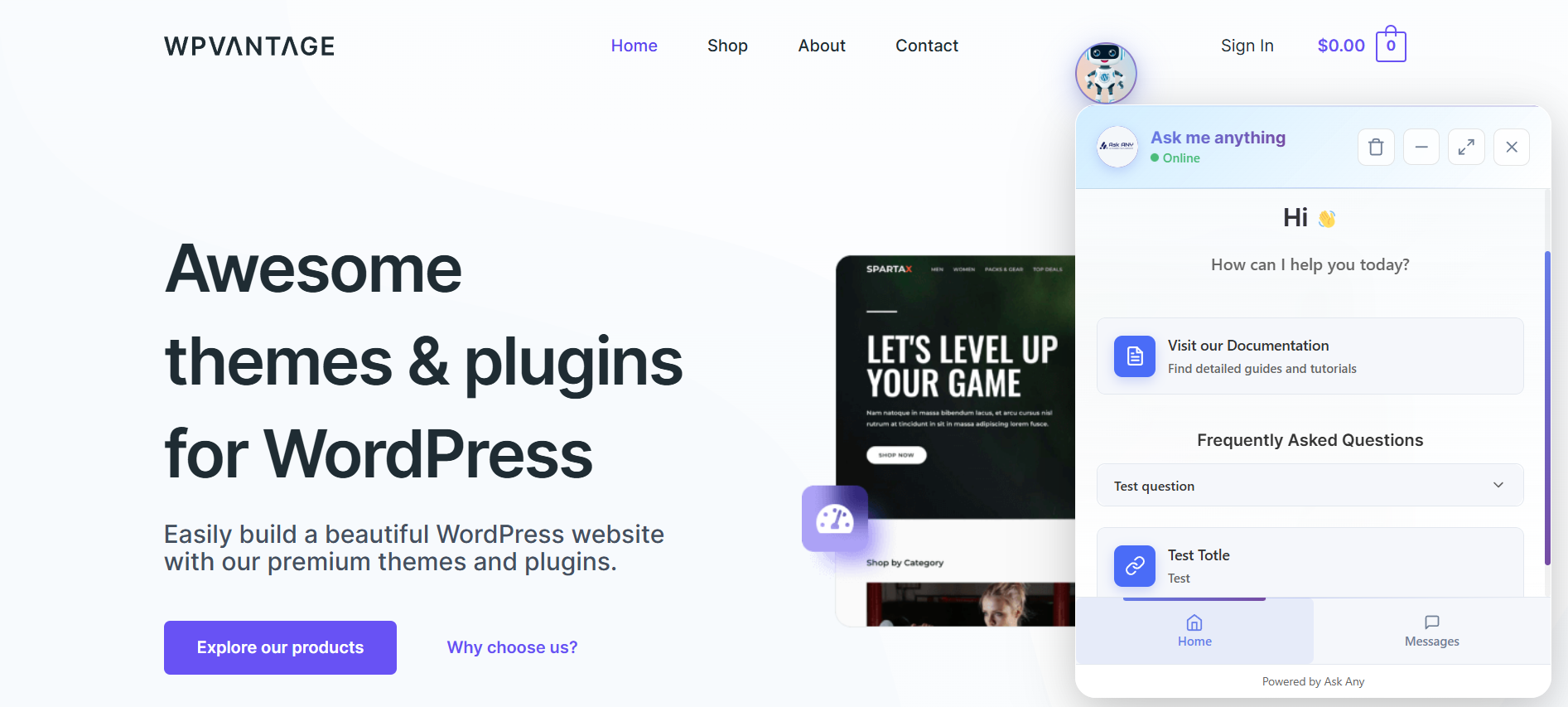
AI Chat Widget (Frontend) – Real-time SSE-powered chat widget displaying streamed AI responses with source citations and Markdown formatting. 
Live Agent Dashboard – Admin chat panel showing AI conversations with one-click agent takeover, unread badges, and conversation history. 
Homepage & Widget Customization – Configure welcome message, agent avatars, FAQ section, and custom links from the Homepage Settings panel. 
AI Provider Setup – Multi-provider configuration screen: connect OpenAI, DeepSeek, Gemini, Claude, Grok, or OpenRouter with API key and model selection. 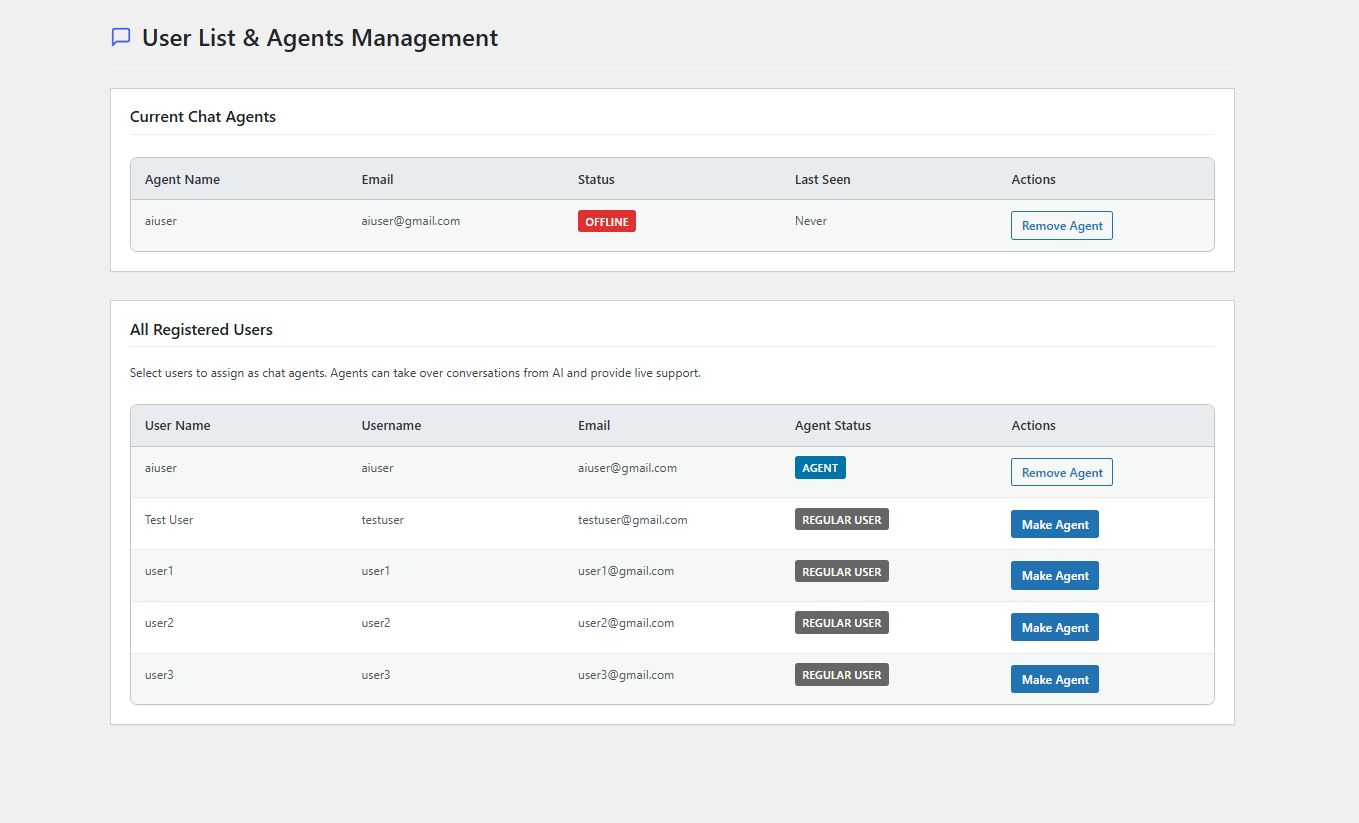
RAG Content Index Panel – Semantic search index management showing indexed posts, pages, products, PDFs, and external sources with health monitoring. 
AI Streaming Responses in Chat – Admin chat panel showing character-by-character AI response streaming with full Markdown rendering. 
Contact Form Embed – In-chat contact form support for Contact Form 7, WPForms, Gravity Forms, and custom shortcodes. 
RAG Architecture Overview – Visual diagram of the Retrieval-Augmented Generation pipeline from query to cited response. 
Integrations Page – WooCommerce and Slack integrations with connection status, plus upcoming Telegram and WhatsApp support. 
Q&A Management – Structured Q&A editor with Markdown support, bulk import/export, and active/inactive toggle for knowledge base management. 
External Sources Manager – Index any external website URL, REST API, or JSON feed as an additional AI knowledge source. 
Database Management – Table size overview with one-click clean, optimize, export, and date-range data deletion tools. 
Typing Animation Control – Character-by-character text reveal with blinking cursor and adjustable speed settings. 
API Statistics Dashboard – Real-time tracking of token usage, costs, response times, and provider performance comparison. 
WooCommerce Order Tracking in Chat – Customer checking order status by email directly inside the chat widget.
Installation
Automatic Installation
- Go to Plugins > Add New in your WordPress admin
- Search for “AskAny”
- Click Install Now, then Activate
Manual Installation
- Download the plugin zip from WordPress.org
- Go to Plugins > Add New > Upload Plugin
- Upload the zip file and activate
Requirements
- WordPress 5.9 or higher
- PHP 7.4 or higher
- An API key from any supported AI provider (OpenAI, DeepSeek, Gemini, Claude, Grok, or OpenRouter)
Initial Setup (5 Minutes)
- Go to AskAny AI > Settings – select your AI provider and enter your API key
- Go to AskAny AI > Content Index – click Index Now to scan your site
- (Optional) Go to AskAny AI > PDF Files – upload product manuals or documentation
- (Optional) Go to AskAny AI > Q&A Management – add custom question/answer pairs
- Enable the floating widget in Settings or use
[askany_chat]on any page
FAQ
-
How is AskAny different from other AI chatbot plugins for WordPress?
-
AskAny is the only free WordPress AI chatbot built on true RAG (Retrieval-Augmented Generation) architecture with real-time SSE streaming, live agent handoff, and native WooCommerce order tracking – all without a monthly SaaS subscription.
Other plugins send your visitor’s question directly to an AI API and return whatever the AI generates. AskAny first retrieves the most relevant sections of your actual site content using semantic search, then uses that retrieved content to generate a grounded, cited answer. The result is dramatically more accurate responses – because the AI is answering from your content, not hallucinating.
Additional differentiators:
* SSE streaming (90% less server load vs polling chatbots)
* Fallback mode – keeps working even if your AI API is down
* Support for 6 different AI providers with no vendor lock-in
* Mobile App Push Bridge for replying from Android -
Which AI providers are supported?
-
OpenAI (GPT-4o, GPT-4.1, O4-mini), DeepSeek, Google Gemini (2.0 Flash, 2.5 Flash-Lite), Anthropic Claude, X.AI Grok, and OpenRouter (100+ models). You can switch between them at any time without losing your indexed content or chat history.
-
Does AskAny work with WooCommerce?
-
Yes – with deeper integration than any other free AI chatbot plugin. AskAny supports real-time order status lookup by email, order ID, or transaction ID; smart product recommendations; stock and pricing queries; and direct add-to-cart from chat. All WooCommerce product data is automatically indexed for RAG retrieval.
-
What is RAG and why does it matter?
-
RAG stands for Retrieval-Augmented Generation. Instead of letting the AI answer from general knowledge (which leads to hallucinations), RAG retrieves the most relevant sections of your site content first, then uses that retrieved content to generate the answer. Every response is grounded in your actual content and includes source citations. This is the same architecture used by enterprise AI systems.
-
Can AskAny read and search PDF documents?
-
Yes. Upload PDFs through AskAny AI > PDF Files and the plugin automatically extracts and indexes the text using RAG, making every page searchable through the chat interface. Supports product manuals, documentation, policies, and technical specifications.
-
AskAny includes a Fallback Mode that keeps the chatbot working using indexed content and smart pattern matching – even when your AI provider API is down. Visitors never see an error. This is a feature no other free WordPress AI chatbot currently offers.
-
How does live agent handoff work?
-
Agents monitor conversations from the WordPress admin chat panel. When a visitor needs human support, the agent takes over with one click – full conversation history and context are preserved instantly. The visitor experiences a seamless transition with no reconnection required. Slack integration notifies agents in real-time; the Mobile App Bridge allows replying directly from Android.
-
Will AskAny slow down my website?
-
No. AskAny uses lazy-loaded scripts (only loads when the chat widget is opened), minified CSS and JS assets, SSE streaming instead of polling, and content hash caching to minimize API calls. It is designed for performance-first deployment on production sites.
-
Is there a Pro version?
-
Yes. The free version includes the AI chatbot, RAG indexing, WooCommerce integration, PDF import, limited live agent seats, limited Q&A pairs, and limited analytics. Pro adds unlimited agent management, unlimited external sources, unlimited Q&A pairs, unlimited live chat links and documents, and priority support. See the plugin website for current Pro pricing.
-
Where can I get support?
-
Free support is available through the WordPress.org support forum. Full documentation is at https://wpazleen.com/docs/. Pro users receive priority support at https://wpazleen.com/support/.
Reviews

Contributors & Developers
“AskAny – AI Chatbot with RAG, Live Agent & WooCommerce Order Tracking” is open source software. The following people have contributed to this plugin.
Contributors

Interested in development?
Browse the code, check out the SVN repository, or subscribe to the development log by RSS.
Changelog
1.12.0 – 2026-04-22
New Features:
– Token / Rate Limiting – Limit how many chat requests each user role can make within a given timeframe
1.11.0 – 2026-03-27
New Features:
– Web Search mode: AI answers questions beyond indexed site content using AI knowledge (Fallback and Always Enhance modes)
– Response Tone Control: Human, Professional, Friendly, or Robotic tone for AI responses
– Typing Animation Speed: Regular, Fast, Faster, and Instant speed options
– Mobile App Push Bridge: real-time push notifications and mobile chat via Android app
Improvements:
– Performance enhancements and frontend chat panel UI improvements
1.10.0 – 2026-01-06
New Features:
– RAG Architecture: full Retrieval-Augmented Generation with semantic search and source citations
– 6 AI Providers: added Anthropic Claude, X.AI Grok, OpenRouter (100+ models), DeepSeek, expanded Gemini and OpenAI models
– Hybrid Search: combined RAG retrieval and keyword matching
– RAG Management Panel: embedding statistics, error logs, retry controls, indexing management
– RAG Optimization: Content Hash Caching and Batch API processing (90% quota savings)
Improvements:
– Markdown formatting in live chat responses
– Markdown support for Q&A management and Homepage FAQ sections
1.9.0 – 2026-02-24
New Features:
– Full conversation context for AI responses (no truncation)
– AI Order Status Tracking: customers check order status via chat by email, order ID, or transaction ID
– Bug Report and Feature Request Mode: in-chat submission with unique tracking IDs
– Blog Post Integration: browse and read blog articles inside the chat interface with Reader View
Improvements:
– Upgraded AI indexing system for improved accuracy and performance
– Enhanced AI learning from past conversation responses
1.8.0 – 2026-01-30
New Features:
– Unread message badge in live chat admin panel
– WooCommerce and Slack integrations panel
– Q&A Pair Viewer
– Q&A bulk import and export
1.7.0 – 2026-01-14
Improvements:
– New AI response language model support
– SDK updated
1.6.1 – 2025-12-24
Improvements:
– SDK updated
1.6.0 – 2025-12-09
New Features:
– Get Started page with embedded form
– Database Management with filter and quick actions
1.5.3 – 2025-12-05
Bug Fixes:
– Fixed duplicate message response
1.5.2 – 2025-12-03
Improvements:
– WordPress 6.9 compatibility confirmed
1.5.1 – 2025-11-12
Improvements:
– Improved frontend chat typing indicator
– Fixed all frontend bugs and error logs
1.5.0 – 2025-11-11
New Features:
– Google Gemini AI integration and new OpenAI models
– Improved frontend chat panel with avatar support
– Improved admin chat panel with avatar support
– Improved Markdown formatting for AI responses
– Enhanced chat indexing for templates and documentation
For a complete changelog, see https://headwayapp.co/askany/ or the changelog.txt file in the plugin’s SVN repository.