Title: Machine Language
Author: Viktor Szépe
Published: September 18, 2014
Last modified: December 26, 2015
---
Search plugins

This plugin **hasn’t been tested with the latest 3 major releases of WordPress**.
It may no longer be maintained or supported and may have compatibility issues when
used with more recent versions of WordPress.
# Machine Language
By [Viktor Szépe](https://profiles.wordpress.org/szepeviktor/)
[Download](https://downloads.wordpress.org/plugin/machine-language.0.3.2.zip)
* [Details](https://kal.wordpress.org/plugins/machine-language/#description)
* [Reviews](https://kal.wordpress.org/plugins/machine-language/#reviews)
* [Installation](https://kal.wordpress.org/plugins/machine-language/#installation)
* [Development](https://kal.wordpress.org/plugins/machine-language/#developers)
[Support](https://wordpress.org/support/plugin/machine-language/)
## Description
Toggles human and machine language (aka ID-s) on admin pages.
#### Only for development!
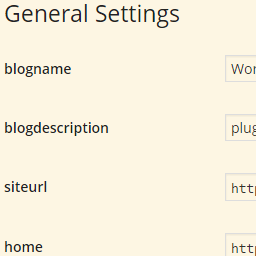
This plugin shows you the ID-s of almost all form fields including selects, checkboxes
and radio buttons like in `wp-admin/options.php`.
It works only on WordPress Settings API-like formatted — not necessarily API generated—
admin pages. E.g. `` elements cannot be wrapped in ``.
#### Activation
You can find the plugin’s checkbox in standard Screen Options (upper right corner).
This checkbox could be overwritten — thus hidden — by poorly written plugins. To
restrict Machine Language to a certain admin page, copy this to your `wp-config.
php`:
```
define( 'MACHINE_LANGUAGE_HOOK', 'load-options-reading.php' );
```
For example this line causes to run only on Settings / Reading.
#### Features
* Basically all input ID-s are displayed in place of labels, actually `for` attributes
of labels
* `select`-s get a title showing all option values comma separated (hover over `
select`-s with your mouse)
* `option`-s get values appended in the form of “original option text|value”
* Radio button labels will show: “name|value”
* Descriptions (`p`-s and `span`-s with “description” class) will be hidden, this
way Machine Language will clean up all admin pages, descriptions are hidden by
CSS, so there’s no [FOUC](http://en.wikipedia.org/wiki/Flash_of_unstyled_content)
#### Other notes
* `select`-s with empty values are not
* The plugin’s checkbox in Screen Options is effective immediately
* The code is designed as a must use plugin, so there is no separated Javascript
or CSS file
* State of Machine Language is saved as a user option so it is a per user setting
#### Links
Development goes on on [GitHub](https://github.com/szepeviktor/machine-language).
## Screenshots
[⌊Setting / Reading with Machine Language turned on.⌉⌊Setting / Reading with Machine
Language turned on.⌉[
Setting / Reading with Machine Language turned on.
## Installation
This section describes how to install the plugin and get it working.
1. Upload `machine-language.php` to the `wp-content/mu-plugins/` or `wp-content/plugins/`
directory
2. Activate the plugin through the ‘Plugins’ menu in WordPress (if you’ve chosen the`
plugins` dir)
## FAQ
#### How can I inspect form fields not altered?
Even if your admin page is not generated by the [Setting API](https://github.com/voceconnect/voce-settings-api)
you should output HTML like in WordPress Settings pages.
#### Should I use Machine Language in production?
No, you shouldn’t.
## Reviews
There are no reviews for this plugin.
## Contributors & Developers
“Machine Language” is open source software. The following people have contributed
to this plugin.
Contributors
* [ Viktor Szépe ](https://profiles.wordpress.org/szepeviktor/)
[Translate “Machine Language” into your language.](https://translate.wordpress.org/projects/wp-plugins/machine-language)
### Interested in development?
[Browse the code](https://plugins.trac.wordpress.org/browser/machine-language/),
check out the [SVN repository](https://plugins.svn.wordpress.org/machine-language/),
or subscribe to the [development log](https://plugins.trac.wordpress.org/log/machine-language/)
by [RSS](https://plugins.trac.wordpress.org/log/machine-language/?limit=100&mode=stop_on_copy&format=rss).
## Changelog
#### 0.3.2
* Fixed checkbox handling
* WP 4.4 compatibility
#### 0.3.1
* Code styling
* WP 4.3 compatibility
* Semver
#### 0.3
* Initial release
* The original plugin was “Hide Descriptions”
## Meta
* Version **0.3.2**
* Last updated **11 years ago**
* Active installations **Fewer than 10**
* WordPress version ** 3.8 or higher **
* Tested up to **4.4.34**
* Language
* [English (US)](https://wordpress.org/plugins/machine-language/)
* Tags
* [admin](https://kal.wordpress.org/plugins/tags/admin/)[debug](https://kal.wordpress.org/plugins/tags/debug/)
[debugger](https://kal.wordpress.org/plugins/tags/debugger/)[debugging](https://kal.wordpress.org/plugins/tags/debugging/)
[developer](https://kal.wordpress.org/plugins/tags/developer/)[development](https://kal.wordpress.org/plugins/tags/development/)
[option](https://kal.wordpress.org/plugins/tags/option/)[options](https://kal.wordpress.org/plugins/tags/options/)
[screen](https://kal.wordpress.org/plugins/tags/screen/)[setting](https://kal.wordpress.org/plugins/tags/setting/)
[settings](https://kal.wordpress.org/plugins/tags/settings/)
* [Advanced View](https://kal.wordpress.org/plugins/machine-language/advanced/)
## Ratings
No reviews have been submitted yet.
[Your review](https://wordpress.org/support/plugin/machine-language/reviews/#new-post)
[See all reviews](https://wordpress.org/support/plugin/machine-language/reviews/)
## Contributors
* [ Viktor Szépe ](https://profiles.wordpress.org/szepeviktor/)
## Support
Got something to say? Need help?
[View support forum](https://wordpress.org/support/plugin/machine-language/)
## Donate
Would you like to support the advancement of this plugin?
[ Donate to this plugin ](https://szepe.net/wp-donate/)