
Description
- You don’t have to enter shipping days for each product, just enter it once in shipping method and it applies to all product
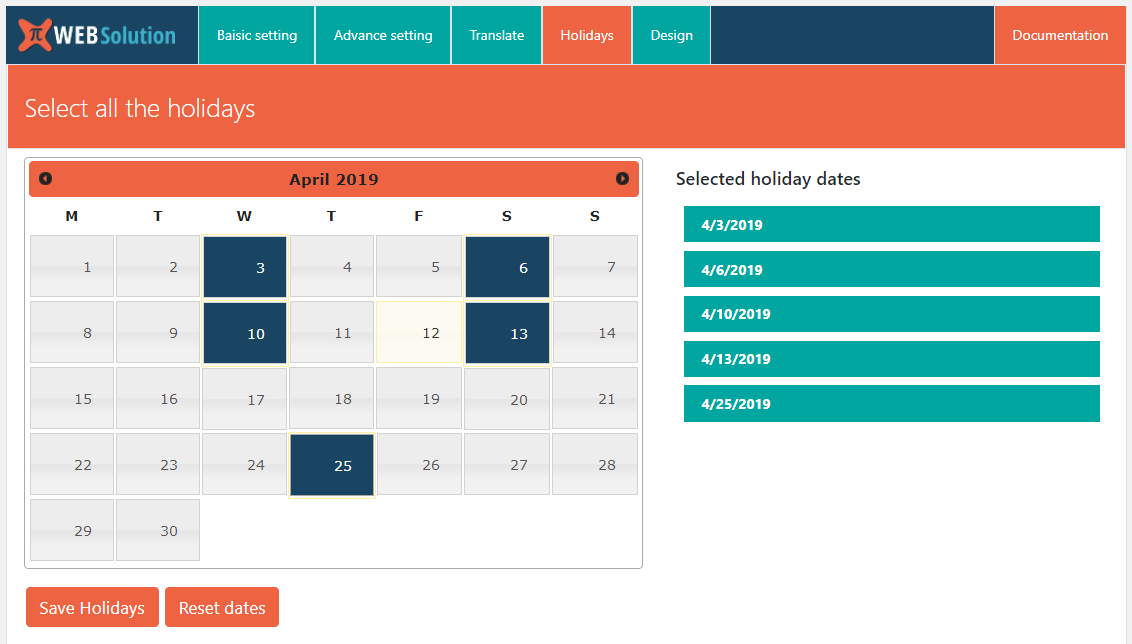
- Add holidays, so you can get more accurate delivery estimate, Free version allows only 5-holiday date to be added
- Product preparation time is added in the estimate of the delivery date
- Estimate date = shipping days + product preparation days
- If your product has production time then you can add that for that specific product as well
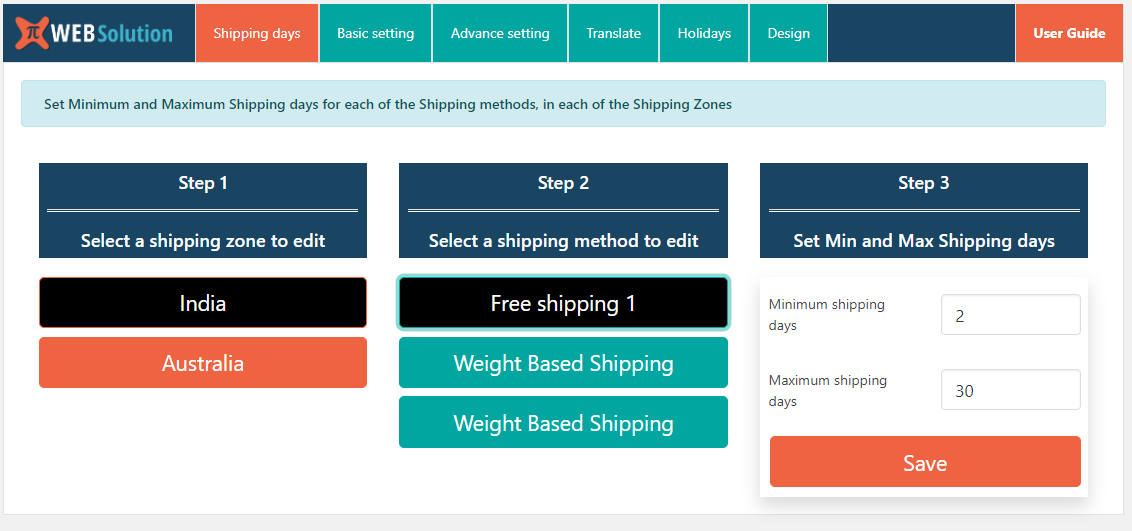
- Adding delivery days for each of the shipping methods in different zones
- Show estimated delivery days on Single product, Shop page product, Cart or Checkout page
- Show Range of estimate date, e.g. Estimated delivery days is between min_date and max_date
- Change the text shown along with the estimated date on the Cart page, Single product page or Shop page
- Allows you to set default shipping zone, this shipping zone is used to calculate the estimated delivery date when the user comes first and they have not specified the address
- Change delivery estimate once user select address on cart or checkout page
- Estimate dates change with Ajax
- Change position of the estimated delivery date on the Single product page
- Change position of the estimated delivery date on the Shop page
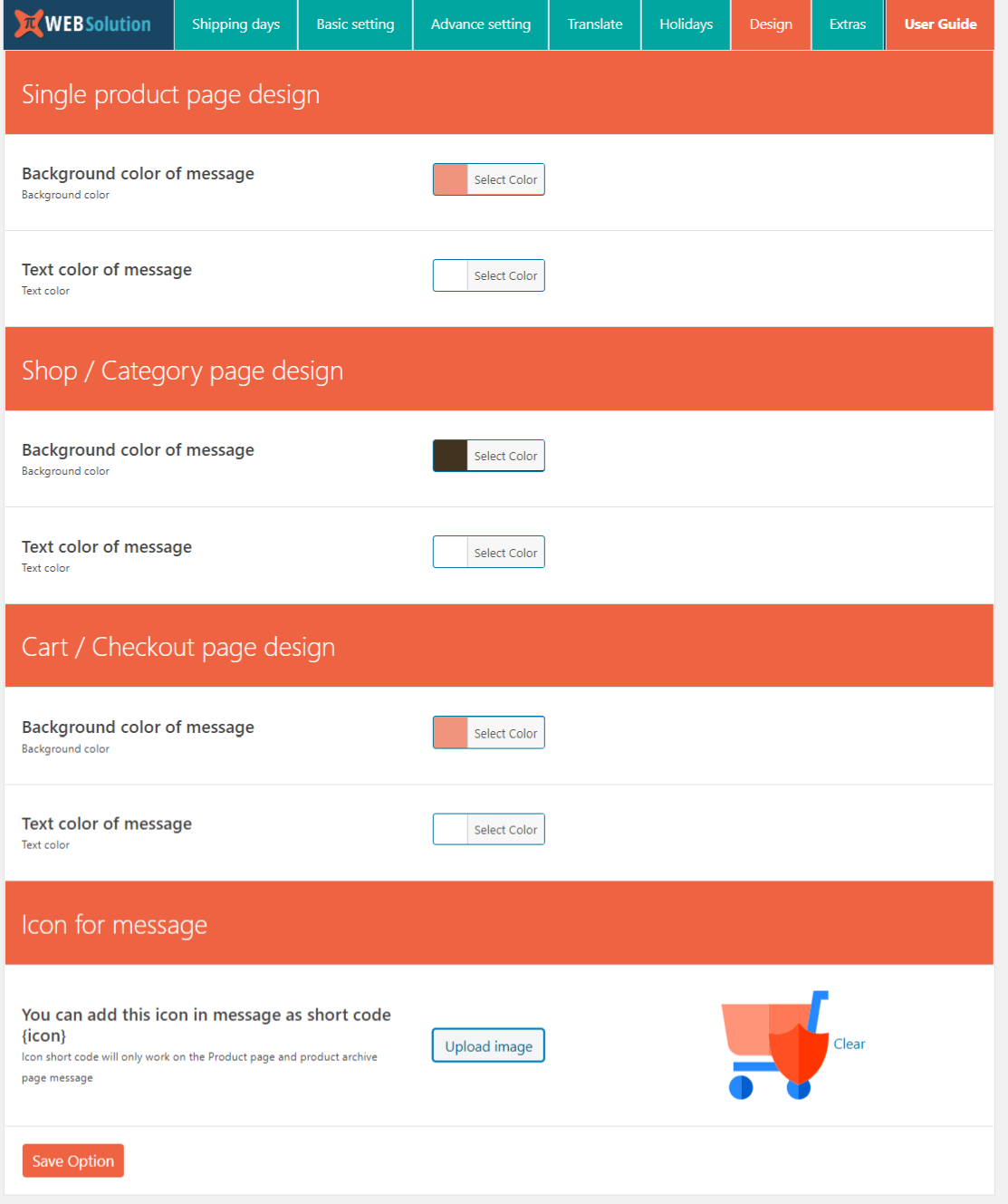
- Change background color or text color of the estimated date message on the Cart page, Shop page or a single product page.
- You can have different colors for these pages
- It works with all the shipping method that comes with the WooCommerce
- Show expected date and time of the order in the order summary table for the admin
Supported advanced shipping / dynamic shipping method
- Pro version is compatible with WooCommerce Weight Based Shipping
- Pro version also compatible with Appmaker – Convert WooCommerce to Android & iOS Native Mobile Apps
- Pro version also work along with Product page shipping calculator for WooCommerce
Pro features
Buy Pro version for $34 only | Try all features of PRO on Demo site
- Change the date format of the estimated delivery date
- Disable estimate message on Cart page,
- Disable estimate message on Shop page
- Disable estimate message on Single product page
- Product preparation time is added in the estimate of the delivery date
- Add Min/Max preparation time for the product
- Option to disable range and show single date
- Add unlimited holiday dates in the system
- Estimate date of individual product
- Estimate date of complete order as one date
- Option to show estimate as days count
- Customize estimate messages with more control
- Estimated dates are included in order detail and order email
- Add extra time to product preparation time when product is out of stock and you are allowing back-order
- You can add Extra out of stock time to each product and in the variable product you can add it to each variation as well
- Specify the days on the week when your Shop/Shipping company is closed
- Show estimate dates below each of the shipping methods, so user can select method as per there delivery requirement
- Option to specify exact product estimate date, if the product will be available to you on some future date for selling then you can’t give estimate based on preparation time, in such case you can enter exact date E.g: if you have some seasonal product that comes on some fix date
- Have different wording for product estimate when the estimate date is next date E.g: Delivery by Tomorrow
- Have different wording for product estimate when the estimate date is same day E.g: Delivery by Today
- Insert estimate using short code [estimate_delivery_date id=”product_id”]
product_id = will be replaced with the ID of the product for which you want to see the estimate - You can add icon in the estimate message on product and product archive page using short code {icon}
- You can even add your custom icon file for the icon from the plugin setting
- It support Ajax option for the estimate on the product/product category page so you can use caching on the product/archive page and still have proper estimate
- Show estimate date even for the dynamically added shipping methods watch video
- Use product stock arrival date to show exact estimate when product becomes out of stock
- Pro version is compatible with the Shipping cost calculator, so your user can see estimate date for each of the shipping method on product page for there location
Product page shipping calculator for WooCommerce - Set default min, max shipping days so you always have an estimated delivery date
- Option to disable estimated shipping days for specific shipping method
- Set a cutoff time (that is last time of the day when shipping company will pickup items from your shop for delivery), you can set different cutoff time for different shipping methods or you can set one global cutoff time that will apply to all shipping method
Key points
- WooCommerce estimated delivery date free download
- WooCommerce estimated delivery date and time plugin
- Estimated delivery date plugin for WooCommerce free
- WooCommerce estimated delivery date per product
- Estimated delivery for WooCommerce
Screenshots
FAQ
-
How it calculates estimated time
-
It adds one extra field in the Shipping method as Minimum Days,
1 Go to WooCommerce Setting > Shipping tab
2 open Shipping zone
3 Open Shipping method
4 Insert “Minimum Days” as the number of days it will take to ship using this method for that shipping zoneBased on these minimum days it calculates shipping days for the particular product
-
Plugin is not showing any estimate
-
- Go to WooCommerce > Estimate Delivery date
- Basic Setting
- Select a shipping zone that you want to use as default shipping zone
this is needed, as when the customer comes to your site for the first time they have not specified
there country so we cant estimate time. If you have selected this default zone then we use this to show them estimate till the time they select there country or zone -
I am getting “You must have shipping zones to use this plugin, so create shipping zone in WooCommerce”
-
You must have a shipping zone setup to use this plugin,
So do this1 Go to WooCommerce Setting > Shipping tab
2 open Shipping zone
3 Open Shipping method
4 Insert “Minimum Days” and “Maximum days” as the number of days it will take to ship using this method for that shipping zoneIf your shipping provider only gives one estimate date and not a range then you should only add that number in Minimum days and leave the Maximum days as blank
-
My product have preparation time
-
Plugin allows you to add product preparation time for each product
so it can give an estimate based on the product preparation days, you can find that inside the product edit page “Preparation time” tabyou can add min/max preparation time for the product
-
I want to change the date format
-
Pro version allows you to change the date format
-
I want to change the text shown along with the estimated date
-
You can do that from Advance setting tab “Estimated date, Wording” option
you can set a different message for the Single product page, shop page, and cart page -
I don’t want to show the estimate on Category page
-
Pro version allows you to control where you want to show it
-
I want to change the position of the message
-
You can change the from the advance setting tab
-
How to add holidays to my delivery estimate
-
It is very simple just go to the Holidays tab in the plugin and there you have a calendar, You just have to select the dates that are holidays for you.
The Plugin will automatically use those holiday dates to calculate the estimate. -
I can’t select more dates on holiday calendar
-
The FREE version only allows adding 5 holidays, once you have selected 5 dates it won’t allow you to select more dates.
You have to remove the holidays that are over and then u can add new holidaysYou can overcome this limitation in the pro version, as it allows unlimited holidays. so you can add complete year holidays at once
-
I want to add complete year holidays at once
-
Pro version allows you to add complete year holidays at once, so you don’t have to do that all the time
-
I want to hide the estimate on the cart page but show on the checkout page
-
You can do that in the pro version
-
I have lots of product on site, but I only want to show an estimate on a few of the product, but now it is showing an estimate on all the product
-
In Pro version there is bulk enable/disable option, using that you can disable estimate for all the product by one click, then you can go inside each product where you want to show the estimate and enable the estimate there
-
We allow back-order (allow an order for the product when they are out of stock), and those back-order generally takes more than normal product preparation time so how we can show estimate for them
-
In the Pro version, you can add extra time takes for the back-order inside each of the products (and their variation). This extra time is added in the normal product preparation time when we are showing the estimate for the product when they are been back-order
-
I have a product for which there is 1 unit available and we allow back-order for it what will happen when a user adds 2 unit in the cart, what estimate will be shown in such case
-
On the product page, it will show the estimate based on the product preparation time, but when he adds 2 unit (and since 1 was available) this becomes back-order so when they go to checkout page they will see an estimated date based on preparation time + back-order time
-
Can I set different back-order date for each of the variation
-
Yes, you can either set different back-order date for each variation or you can set one for complete product
-
I am using WooCommerce Weight Based Shipping but it is not showing estimate
-
Pro version is compatible with WooCommerce Weight Based Shipping plugin
-
My shipping company does not work on Sundays
-
In pro version you can insert the days of the week when your shipping company is not working this will improve the accuracy of the estimate
-
Our shop is closed on Monday but shipping company is working on Monday
-
You have a separate field to specify the days when your shop is not working that will improve the accuracy of the estimate
-
Can I show estimate time for each of the shipping methods below their name
-
Yes, you can show estimate time for each of the supported shipping method, this estimate date range will be shown on the Cart/Checkout page below each of the method
-
I have some product that comes to us on fix date, so will like to enter those fixed date instead of product preparation time
-
For this kind of situation, pro version allows you to specify a exact date for a product (you can insert the date product will be available to you for selling) and the plugin will add the shipping time to that date and then show the estimate date
-
I have product that have delivery date next and I don’t want to show next day date, instead want to show something like “Delivery by tomorrow”
-
You can do that in the pro version, in pro version it can show different estimate message for next day delivery. so you can make it say “Delivery by Tomorrow” or “Next day delivery” or “Delivery by next day”.
-
I have product that have same day delivery and I don’t want to show date, instead want to show something like “Delivery by today”
-
you can do that in the pro version, it allows you to set a different message for such condition where delivery date is on same day, E.g: “Delivery by Today”
-
Can I add estimate message using short code
-
Yes you can insert estimate using short code [estimate_delivery_date id=”product_id”]
product_id = will be replaced with the ID of the product for which you want to see the estimate -
Can I add a icon in the estimate message on product page
-
Yes in pro version you can add icon using the short code {icon}, and you can even load your custom icon
-
My estimate are shown wrong on the product page due to product page caching
-
Pro version support Ajax loading of the estimate on the single product page, so caching will not affect it
-
Can I use ajax loading of estimate on product archive pages
-
In pro version you can use ajax loading of estimate on archive pages as well
-
I have some dynamic shipping method added by some 3rd party plugin
-
pro version allows you to shown estimate for date for such 3rd party added shipping method that are added dynamically and are not part of any WooCommerce shipping zones watch video
-
Show estimate based on new stock arriving date
-
In Pro, you can specify exact date when the new lot will arrive and that date will be used for calculating the estimate when the product becomes out of stock (get available on back-order)
-
Can we show shipping method for user location on product page with estimate date
-
The pro version is compatible with Product page shipping calculator for WooCommerce that allows your user to view the shipping method for there location right on the product page, and when you use that plugin along with Pro version of estimate delivery date plugin then it will show the estimate date for each of the shipping method as well
-
Range of product preparation time
-
Yes in the pro version you can add range of preparation time for estimated shipping date
-
I want to show cutoff time counter for the estimate date
-
In the pro version you can show cutoff time counter for the estimate date on the product page estimate message, so user can see how much time is left to get this estimate date
-
Is it HPOS compatible
-
Yes the Free version and PRO version both are HPOS compatible
Reviews


Contributors & Developers
“Estimated delivery date per product for WooCommerce | shipping date per product for WooCommerce” is open source software. The following people have contributed to this plugin.
Contributors
Interested in development?
Browse the code, check out the SVN repository, or subscribe to the development log by RSS.
Changelog
4.10.26
- Product preparation time is added in the estimate of the delivery date, now available in free version as well
4.10.17
- Tested for WC 6.3.0
4.10.13
- HPOS compatible
- Tested for WC 7.2.2
4.10.12
- Tested for WP 6.2.2
4.10.11
- Tested for WC 7.7.0
4.10.6
- Tested for WC 6.2.0
4.10.0
- Tested with WC 7.3.0
- Made compatible with HPOS data base structure
- New pro feature detail added in